9Ubet App
Want your bets, Kandege and M-Pesa payments in one place? Get the 9Ubet app from Google Play, log in and start playing from your phone. Download it today and take the action wherever you go.
- BCLB licensed
- M-Pesa Paybill 989878
- 24/7 support
9Ubet app
- AndroidGoogle Play
- iPhoneApp Store badge
- DepositPaybill 989878
- WithdrawM-Pesa / Airtel Money
Functions Available in the 9Ubet App
The 9Ubet app lets you do your main betting and account tasks from your phone. The official Download App page promises faster access to sports, casino and live games.
Here is what you can do in the app:
- Bet on sports and live matches
- Play casino games and live tables
- Play Aviator, also known as Kandege
- Deposit money into your account
- Withdraw your winnings
You use the same 9Ubet account as on the site, so your details stay in one place. If you already have an account, you can go straight to login.
Differences Between the 9Ubet App and the Mobile Site
The main difference is installation. The app sits on your phone, while the mobile site opens in your browser with no download.
| Feature | 9Ubet app | Mobile site |
|---|---|---|
| Access | Tap the app on your phone | Open 9Ubet.co.ke |
| Installation | Required | Not required |
| Phone storage | Uses storage | No app to store |
| Updates | Through Google Play | No app update needed |
| Account | Same account | Same account |
Do you bet often? The app gives you direct access from your home screen. If your phone is low on storage, the mobile site is a good option. You can use both, sawa?
Device Requirements and Updates for the 9Ubet App
The app is for Android phones, and the Google Play listing shows the requirements for your device. You also need enough free storage and a stable internet connection.
To update the app:
- Open Google Play.
- Find the 9Ubet app listing.
- Tap Update if the button appears.
Keep the app updated, especially if it starts acting up. An update can sort out some loading problems.
Steps to Download the 9Ubet App
You can get the app from the Google Play Store in a few taps. Starting from the official site helps you land on the right listing.
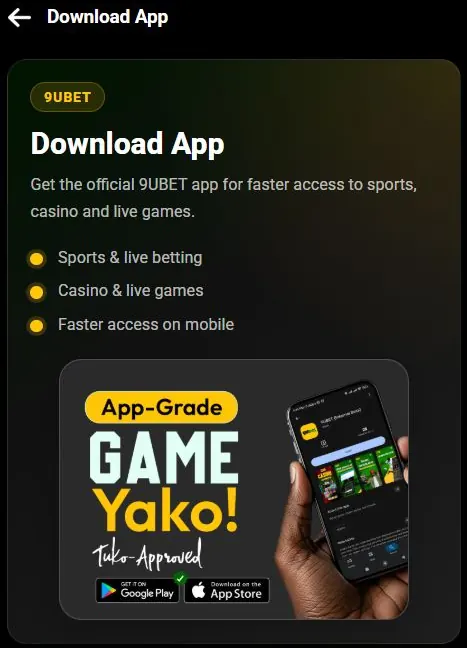
- Open 9Ubet.co.ke in your phone's browser.
- Tap More in the menu and find Download App.
- Tap the Google Play badge.
- Check the listing and tap Install.
- Open the app when the installation finishes.
Hiyo ni yote! Google Play handles the installation for you, so you do not need to change any security settings. iPhone users can check the App Store badge on the same Download App page.
9Ubet APK File and Third-Party Download Risks
An APK is the file format that Android uses to install apps. Google Play handles this file for you, so you do not need to look for one on other sites.
Be careful with a 9Ubet APK sent on WhatsApp or Telegram, or posted on a random website. A file from an unknown source can be modified, and it can put your account at risk.
Stick to these simple rules:
- Download through Google Play.
- Start from the official 9Ubet.co.ke site.
- Do not enter your password in an app you do not trust.
- Do not share your M-PESA PIN or SMS codes.
Not sure about a file? Ask 9Ubet support before you install it.
Registration and Login in the 9Ubet App
New players can register with a Safaricom number and an SMS code. Existing players can log in with their registered number and password, with no need for a new account.
To register:
- Tap Join.
- Enter your Safaricom number and tap Get Code.
- Enter the SMS code and create your password.
- Accept the terms and create your account.
To log in, enter your number and password, then tap Log In. On your own phone, you can tick Keep me logged in. If you forget your password, tap Forgot Password? and reset it by SMS.
Deposits and Withdrawals in the 9Ubet App
The app is built for quick betting and money moves on the go. You deposit through M-Pesa from KES 10 and withdraw to M-Pesa or Airtel Money.
To deposit:
- Open M-PESA on your phone.
- Select Lipa na M-PESA, then Pay Bill.
- Enter Paybill number 989878.
- Enter your registered 9Ubet number as the account number.
- Enter the amount and your M-PESA PIN.
To withdraw:
- Log in and tap your profile icon.
- Select Withdraw.
- Enter an amount within the allowed limits.
- Choose your payment method and confirm.
Most deposits reflect instantly, and most withdrawals are fast. The time can depend on your mobile money provider. Remember to bet only what you can afford.
Common 9Ubet App Problems
Most app problems are quick to fix with a few simple checks. If you get stuck, 9Ubet support is open 24/7.
| Channel | Contact |
|---|---|
| Phone | +254 709 549 599 |
| +254 113 499 999 | |
| support@9Ubet.com |
App Download or Installation Failure
A failed download usually comes from a weak connection or low storage. Try these steps:
- Check your mobile data or Wi-Fi.
- Free up storage on your phone.
- Restart your phone.
- Open the listing through 9Ubet.co.ke and tap Install again.
Still not working? Use the mobile site for now, so you do not miss your match.
App Login Errors
Login errors usually mean that your number or password needs checking. Enter your registered number and retype your password.
If you see "invalid credentials," reset your password with Forgot Password?. If you see "user not found," check that you are using the number you registered. Send support the exact message if the error remains.
App Not Opening or Loading
If the app does not open or load, check your internet connection first. Then close the app and open it again.
If that does not help, try these fixes:
- Update the app in Google Play.
- Restart your phone.
- Remove the app and install it again.
- Log in through the mobile site.
Removing the app does not close your 9Ubet account, so you can log in again after reinstalling it.
Frequently Asked Questions
Here are quick answers to the questions players ask most about the 9Ubet app.
Is the 9Ubet app free to download?
The official Download App page lists no download fee. Your normal internet data charges may apply.
Where can I download the 9Ubet app?
You can download the Android app from the Google Play Store. The Download App page on 9Ubet.co.ke links to it.
Is there a 9Ubet app for iPhone?
The Download App page shows an App Store badge for Apple devices. iPhone users can also use the mobile site at 9Ubet.co.ke.
Is the 9Ubet APK safe to install?
Use Google Play, because it handles the installation for you. A file from an unknown source can be modified and can put your account at risk.
Can I withdraw money through the 9Ubet app?
Yes, you can withdraw through the app. Tap your profile icon, select Withdraw and confirm the amount and payment method.