9Ubet Login
Your bets, balance and bonuses are waiting for you. Log in to 9Ubet with your number and password, and get back in the game. If anything blocks you, the fixes are right here.
- BCLB licensed
- M-Pesa Paybill 989878
- 24/7 support
You only need
- Mobile numberafter +254
- Passwordletters + numbers
- ResetForgot Password?
- Support24/7
Details Required for 9Ubet Login
You need only two things to log in: your registered mobile number and your password. There is no separate username to remember.
| Detail | What to use |
|---|---|
| Mobile number | The number you used to register, after +254 |
| Password | The password you created or last reset |
Keep your registered SIM close too. You will need it if you ever have to reset your password by SMS.
Steps to Log In to 9Ubet
Logging in takes a few taps on the site or the app. Use the same details on both, because it is the same account.
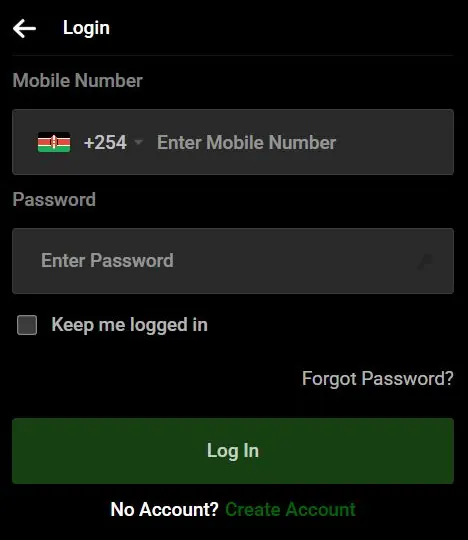
- Go to 9Ubet.co.ke or open the 9Ubet app.
- Tap Login.
- Enter your registered number after +254.
- Enter your password.
- Tap Log In.
Na uko ndani! From here, you can top up through Paybill 989878, open the sports page or jump into Kandege. It is also worth checking the Promotions page for current offers.
If you do not have an account yet, tap Create Account at the bottom of the login form. It only takes a few steps.
9Ubet Password Reset Steps
Forgot your password? Usijali. You can reset it yourself with an SMS code, and you do not need to call anyone.
- Tap Login, then Forgot Password?.
- Enter your registered mobile number.
- Enter the verification code from the SMS.
- Choose a new password.
- Log in with your new details.
Your new password should mix letters and numbers and meet the minimum length shown on the screen. Pick something easy for you to remember but hard for others to guess. Avoid your name or your birth date.
Common 9Ubet Login Problems
Most login problems are small and easy to sort out. Here is a quick guide to the first thing you should try.
| What you see | First thing to try |
|---|---|
| User not found | Check the number you entered |
| Invalid credentials | Retype your details or reset your password |
| No SMS code | Check your number and network |
User Not Found Error
This message means that the system cannot find an account on the number you entered. Most of the time, a digit is wrong or a different line was used for registration.
Check the number carefully and try again. If you have more than one line, try the other one. Still no luck? Send support your registered number and they will check it for you.
Invalid Credentials Error
This error means that your number or password was not accepted. It often comes from a simple typing mistake.
Try these steps:
- Retype your number and password slowly.
- Reset your password if you are not sure about it.
- Log in with the new password.
- Contact support if the error remains.
Tell support the exact message on your screen. It helps them find the problem faster.
SMS Reset Code Not Received
A missing code usually means a wrong number or weak network. Confirm that you entered your registered number and that your SIM is active.
Then check your SMS inbox and try again if the option is available. If the code still does not come, contact customer care with your registered number. Remember, the code is for you only, so do not share it with anyone.
9Ubet Customer Care Contacts
9Ubet customer care is available 24/7, so you can get help any time, even in the middle of a big match night.
| Channel | Contact |
|---|---|
| Phone | +254 709 549 599 |
| +254 113 499 999 | |
| support@9Ubet.com |
Have your registered number and a screenshot of the error ready. Once the team sorts you out, you can get straight back to your bets. Keep it fun, and bet only what you can afford.
Frequently Asked Questions
Here are quick answers to the questions players ask most about logging in.
How do I log in to my 9Ubet account?
Tap Login on 9Ubet.co.ke and enter your registered number and password. Then tap Log In.
What should I do if I forgot my 9Ubet password?
Tap Forgot Password? and enter your registered number. Use the SMS code to choose a new password.
Why can't I log in to my 9Ubet account?
Your number or password may be incorrect, so check both and reset your password if needed. If the problem remains, contact support with the exact error message.
Can I stay logged in to 9Ubet on my phone?
Yes, tick Keep me logged in on the login form. Use this option only on your personal phone.
Who do I contact if I still cannot log in to 9Ubet?
Contact 9Ubet customer care on +254 709 549 599 or WhatsApp +254 113 499 999. You can also email support@9Ubet.com at any time.