9Ubet Registration
Your 9Ubet account is only a few taps away. Grab your Safaricom line, follow the steps below and open your account today. Then top up from KES 10 and place your first bet.
- BCLB licensed
- M-Pesa Paybill 989878
- 24/7 support
Requirements for 9Ubet Registration in Kenya
To register on 9Ubet, you need to be at least 18 and have an active Safaricom number. You also need a password, and that is pretty much it.
| Requirement | Details |
|---|---|
| Age | 18 and above |
| Phone number | Active Safaricom line |
| Country prefix | +254 |
| Verification | SMS code |
| Password | Letters and numbers, at minimum length shown on screen |
| Referral code | Optional |
Make sure the line is one you use daily. Your number becomes your login, and password reset codes go to it. Each player can have one 9Ubet account only, so one account is all you need.
Steps to Register a 9Ubet Account
You can create your account on one short form. Have your phone close, because the code comes by SMS.
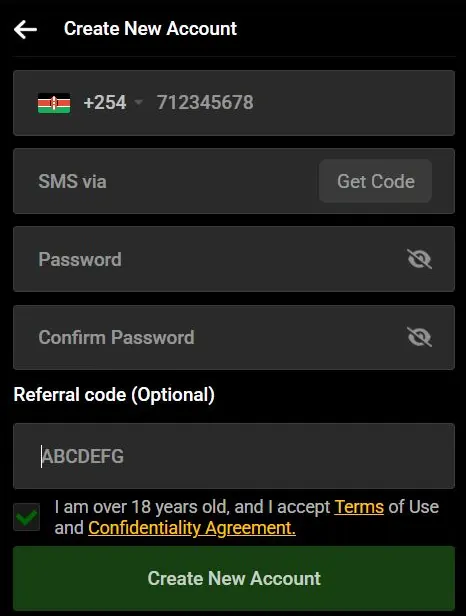
- Go to 9Ubet.co.ke and tap the green Join button.
- Enter your Safaricom number after +254.
- Tap Get Code and enter the code from the SMS.
- Create your password and enter it again to confirm.
- Add a referral code if you have one.
- Tick the box to confirm that you are over 18 and accept the terms.
- Tap Create New Account.
Hiyo ni yote! Your account is created immediately. You can now deposit and start betting on football, slots or Kandege.
Do you prefer the app? You can download the 9Ubet Android app from Google Play through the Download App page on the site.
9Ubet Referral Code During Sign-Up
A referral code is optional. If a friend invited you to 9Ubet, enter their code in the Referral code field. If you do not have one, leave the field empty and continue.
The code matters most to your friend, because it links you to their Jenga Mbogi network. After you join, you can build your own mbogi too. The program is free to join, and it lets you earn commissions and bonuses when the people you invite deposit and bet. Earnings can reach up to KES 500,000, subject to the program rules.
Steps to Log In After 9Ubet Registration
To log in, use the same number and password that you just registered. It only takes a moment.
- Tap Login at the top of the site.
- Enter your registered number after +254.
- Enter your password.
- Tap Log In.
On your own phone, you can tick Keep me logged in, so you do not have to sign in every time. On a shared phone, leave it empty and log out when you finish.
Forgot your password already? Usijali. Tap Forgot Password?, enter your number and use the SMS code to choose a new one.
First Deposit Through 9Ubet Paybill
You can make your first deposit from just KES 10 through M-Pesa. The 9Ubet Paybill number is 989878, and 9Ubet does not charge a deposit fee.
- Open M-PESA on your phone.
- Select Lipa na M-PESA, then Pay Bill.
- Enter 989878 as the business number.
- Enter your registered 9Ubet number as the account number.
- Enter the amount and your M-PESA PIN.
Most deposits reflect instantly. Your balance then updates, and you are ready to play. Check the Promotions page too, because 9Ubet has offers such as the Daily Rebate and the Aviator Miles Challenge.
Start with an amount you are comfortable with. Betting should stay fun, and no bet is guaranteed to win.
Common 9Ubet Registration Problems
Most sign-up issues are small and quick to fix. If you get stuck, 9Ubet support is open 24/7 and can help you finish.
| Channel | Contact |
|---|---|
| Phone | +254 709 549 599 |
| +254 113 499 999 | |
| support@9Ubet.com |
SMS Verification Code Not Received
A missing code usually comes down to a wrong number or weak network. Check these points first:
- Confirm that you typed your number correctly.
- Make sure that your SIM is active and has network.
- Check your SMS inbox.
- Tap Get Code again if the option is available.
If the code still does not come, contact support and share your Safaricom number.
Password Rejected During Registration
Your password probably does not meet the rules, or the two entries do not match. Use a mix of letters and numbers, and meet the minimum length shown on the screen.
Tap the eye icon to see what you typed. If the form keeps rejecting your password, note the exact error message and share it with support.
Mobile Number Not Accepted
First, check that you entered a Safaricom number, because registration currently supports Safaricom lines only. Airtel and other networks will need to wait for now.
Your number may also be registered already. In that case, try to log in, or use Forgot Password? to get back into your account. Do not open a second account, because that is against the rules. Support can check the number for you if the problem continues.
Frequently Asked Questions
Here are quick answers to the questions new players ask most.
How do I register on 9Ubet?
Tap Join on 9Ubet.co.ke, enter your Safaricom number and verify it by SMS. Then create a password, accept the terms and tap Create New Account.
Can I register on 9Ubet with an Airtel number?
No, registration currently supports Safaricom numbers only. You need an active Safaricom line to sign up.
Is a referral code required for 9Ubet registration?
No, the referral code is optional. You can leave the field empty if nobody invited you.
How old do I need to be to register on 9Ubet?
You need to be at least 18. You confirm this with a checkbox on the registration form.
How long does 9Ubet registration take?
The form has only a few fields, and your account is created immediately after you submit it. You can deposit and bet right away.